Introduction — What is LUTScope?
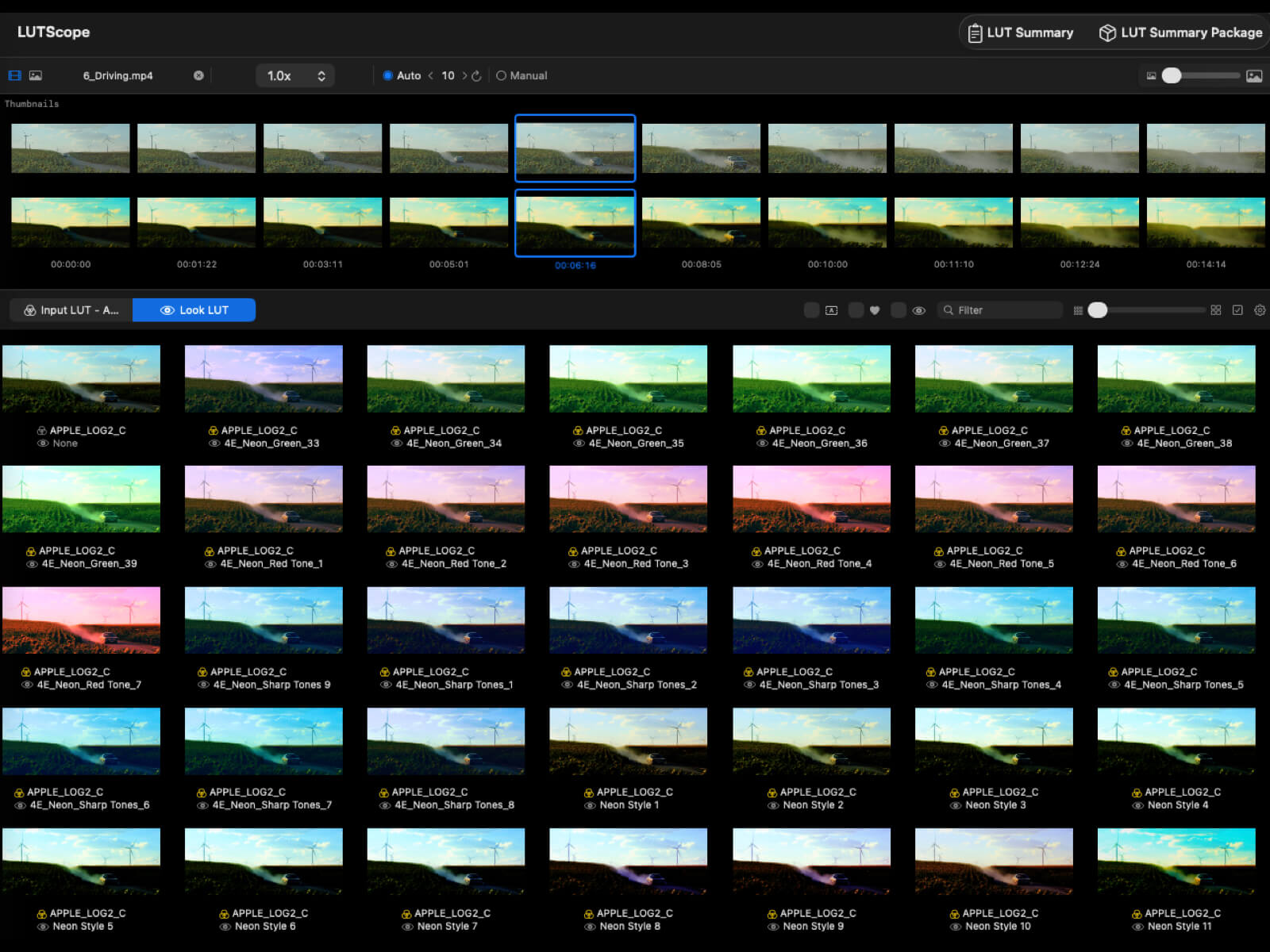
LUTScope is a macOS app that streamlines the color grading workflow for filmmakers. Browse hundreds of LUTs at a glance, preview them through a 2-stage pipeline of Input LUT (camera Log conversion) and Look LUT (creative grade), and quickly find the best look for your footage.
Key Features
- 2-Stage LUT Pipeline: Input LUT → Look LUT applied in sequence. Separates Log conversion from creative grading
- 20-Slot Comparison: Register LUT combinations in slots A–T and compare at a glance
- 3 Favorite Types + Titling: Combination favorites (red heart + custom title), Input LUT favorites (yellow), Look LUT favorites (yellow)
- Favorite Section: Dedicated sidebar panel for browsing, searching, and quick access to favorites
- 1D / 3D LUT Support:
.cube format for both 1D and 3D LUTs (1D is auto-baked to 3D)
- Synced Video Playback: All slots play in real-time sync (±15 s range centered on the selected frame, 30 Hz, loop)
- Metal GPU Rendering: Hardware-accelerated preview
- Anamorphic Desqueeze: 1.0x–2.0x in 7 steps
- LUT Summary Package Export: Bundle LUT files + preview images from favorites or slots
- 8 Languages: Japanese / English / German / French / Spanish / Portuguese / Chinese / System
- Subscription: Mac App Store subscription (14-day free trial on all plans)
| Item |
Details |
| Supported OS |
macOS only (not available on iOS) |
| Rendering |
Core Image + Metal GPU acceleration |
| LUT Format |
.cube (1D / 3D) |
| License / Billing |
Mac App Store subscription (monthly / yearly, 14-day free trial) |
Interface Overview
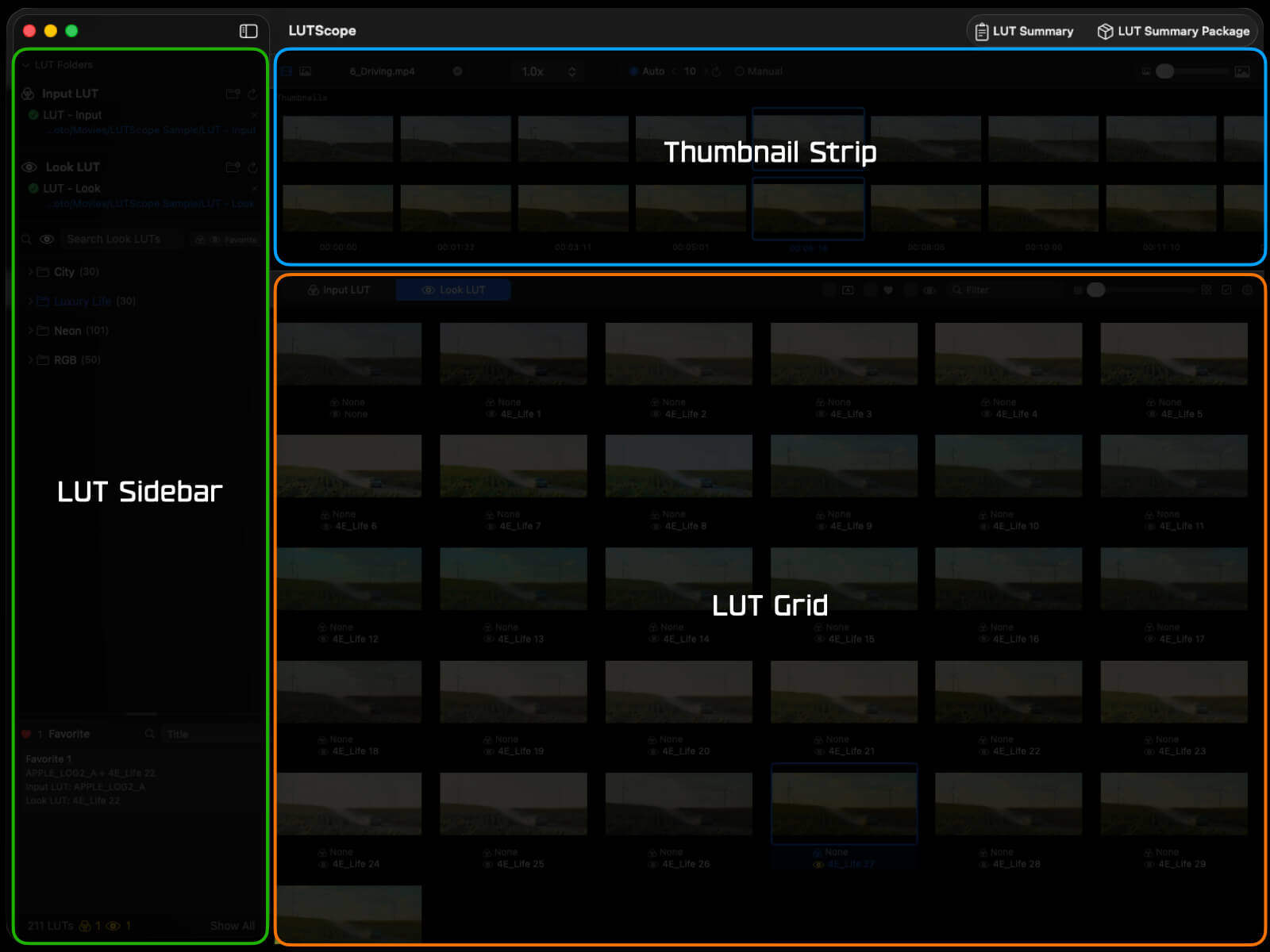
The LUTScope interface consists of three areas in the main window and dedicated sub-windows for specific tasks.
Main Window Layout (3 Areas)
| Area |
Position |
Description |
| LUT Sidebar |
Left |
LUT folder tree, search, favorite filters, Favorite Section |
| Thumbnail Strip |
Top-right |
Video/still image import, frame extraction |
| LUT Grid |
Bottom-right |
Grid view of LUT-applied results, selection & comparison |
Sub-Windows
| Window |
Description |
| Compare Window |
Compare assigned slots (Grid / Side by Side / Slider) |
| Preview Window |
Single LUT large preview (Look intensity 0–200%) |
| Settings Window |
UI, rendering, and language settings |
| Subscription Window |
Purchase & manage subscription |
Subscription (App Store)
LUTScope is offered as a Mac App Store subscription. No license key or activation is required — your access is tied to your Apple ID. Every plan includes a 14-day free trial.
Plans
- Monthly — auto-renewing
- Yearly (recommended) — auto-renewing, cheaper than paying monthly
Both plans start with a 14-day free trial and renew automatically afterward. See the Mac App Store product page for current pricing.
Getting Started
- Download and launch LUTScope from the Mac App Store
- Choose Menu bar > LUTScope > Subscription... to open the subscription window
- Select the monthly or yearly plan
- Complete the purchase in Apple’s dialog to start your 14-day free trial
- When the trial ends, it renews automatically unless you cancel
What Works Before Subscribing
You can try most of LUTScope even without an active subscription.
- Available: Importing video and stills, frame extraction, video playback, preset saving, and favorites
- Limited: The LUT Grid and Compare show only the first 10 cells (10 slots). Cells beyond that are blurred, with a “Subscription required” banner
With an active subscription, the full LUT Grid and the 20-slot Compare are fully unlocked.
Restoring Purchases
If you purchased under a different Apple ID or reinstalled the app, use Restore Purchases in the subscription window to restore your access.
Managing & Canceling
- Manage from Mac App Store > Account > Subscriptions
- To cancel, turn off auto-renew at least 24 hours before the period ends (otherwise it renews automatically)
Technical Details
- Apple ID Entitlement: Access is tied to your Apple ID — no license key needed
- StoreKit: Auto-renewing subscription via Apple’s StoreKit
- Automatic Check on Launch: Subscription status is verified at startup and when returning to the foreground
- Free Trial: 14 days on all plans